

How to Upload Environment Variables to GitLab CI/CD

R
Markdown + Vim fan. Love sharing knowledge with the community
Dev-san, gambare! ᕙ( •̀ ᗜ •́ )👍
To implement CI/CD Gitlab 🦊provides an easy to use interface that you can set and help your project develop faster. Here I share the process I use to add CI/CD variables to a project in Gitlab.
In Gitlab goto left side bar, Settings, CI/CD
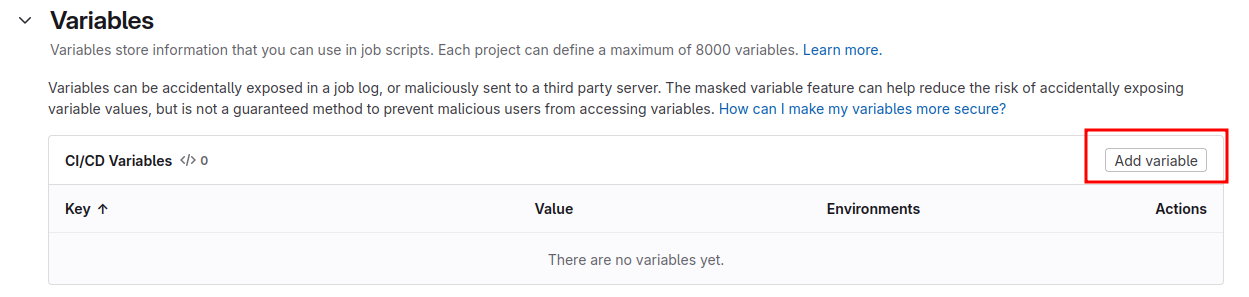
Go to variables section, click add variable
From right side bar select select visible and deselect protect variable
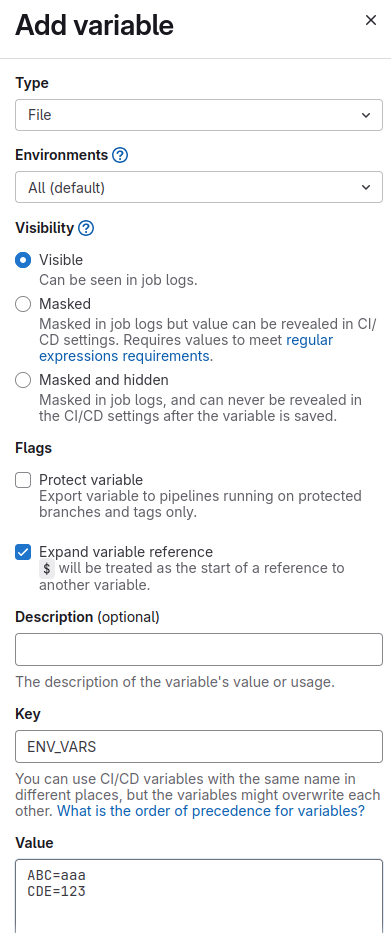
In Key write the name of the file that will store all the variables
In value enter the key and values of your variables (values are written without ")
Make sure that your yml script adds the env vars file
.gitlab-ci.yml
test:
  stage: test
  image: node:22
  before_script:
    - cat "$ENV_VARS" | tr -d '\r' > .env
Now you are ready to integrate the variables to your project and make it evolve. Keep coding dev-san 💻


